How to Download YouTube Thumbnails in HD Without Guesswork
Written and reviewed by Alex Carter, founder and editor of TubeThumb Tools.
Alex tests the site’s browser-based tools, verifies guidance against official YouTube documentation where relevant, and updates articles when workflows or publishing policies change.
Reviewed and updated: March 20, 2026
The real question is rarely “How do I save an image?” It is “Which image is good enough for the thing I need to make next?” This guide is written for that second question.
Open the largest visible thumbnail first, usually maxresdefault.jpg.
If it fails or looks padded, compare sddefault.jpg and hqdefault.jpg.
Save the file together with the watch URL so you can trace it later.
Before you download: does the larger file actually help?
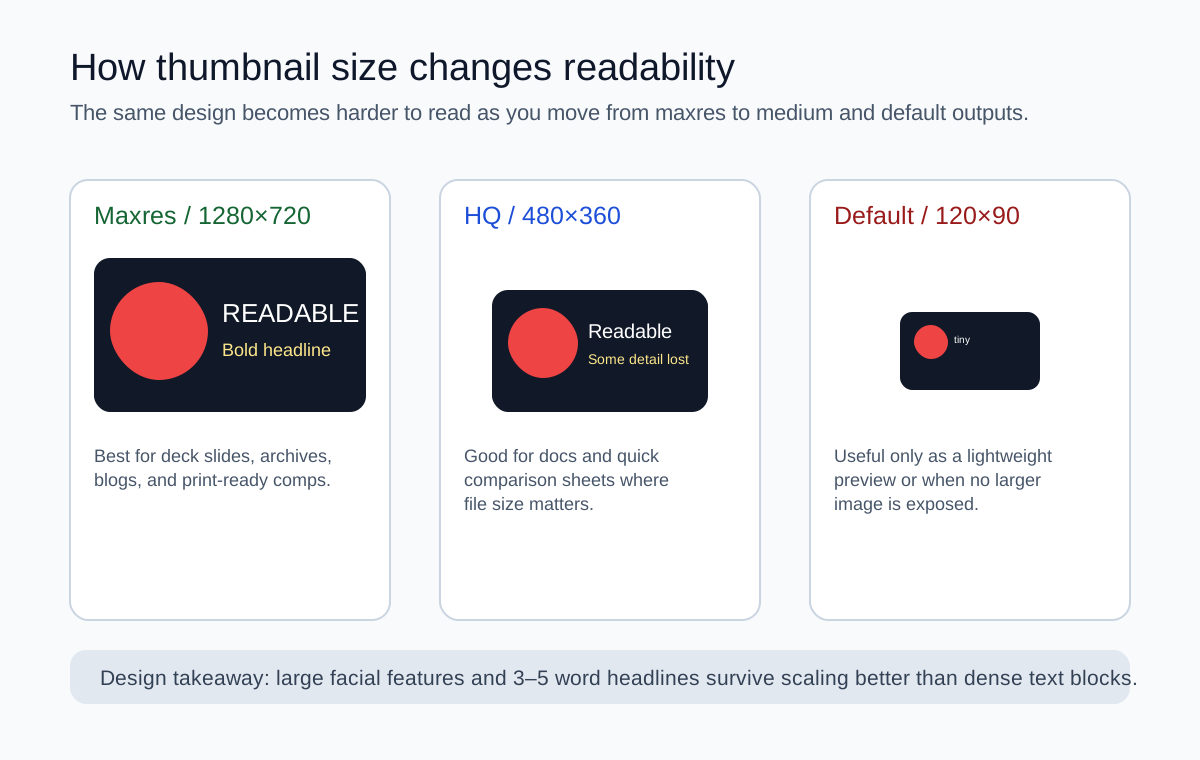
Designers often assume “largest = best,” but the correct answer depends on where the image will be reused. A maxres file gives you more room for crops and annotations; it does not automatically make dense thumbnail text legible in a 120-pixel sidebar. The comparison below shows why.
The same design behaves very differently depending on the size you actually need to display.
Constraint-and-tradeoff table for HD thumbnail work
Role
What “HD” means in practice
Constraint
Tradeoff
Thumbnail designer
Needs the largest file to inspect edges, padding, and retouching artifacts
Some public videos stop at HQ or SD
May have to reference multiple sizes before approving a direction
Journalist or analyst
Needs a clean image for commentary or comparative reporting
Must preserve provenance and context
Should save the URL and publication details with the file
Social manager
Needs a readable image to drop into a post deck quickly
Turnaround matters more than maximum pixels
HQ may be good enough and faster to handle
Course or archive manager
Needs consistent naming and reliable availability
Older videos may not expose maxres at all
SD can be the safer archival fallback
Manual fallback: the URL pattern you should know
If you are documenting a workflow for a team or building internal automation, it is worth knowing the direct filename pattern:
Google’s YouTube Data API documentation explains that available thumbnail sizes vary by resource and by the resolution of the original upload, so treat those filenames as candidates, not guarantees. Official thumbnails documentation.
Troubleshooting: when “HD” is not available
Maxres returns an image but it is tiny or blurry
The channel may have uploaded a smaller source asset that YouTube then resized into standard buckets. In that case, the biggest exposed file is still the best public version, but it is not magically high quality.
Maxres 404s or shows a placeholder
Move down the stack to sddefault or hqdefault. This is normal for many older videos and uploads with modest source resolution.
The video is unlisted or private
YouTube’s visibility settings determine who can access the content. Unlisted videos can often still be referenced by link; private videos are far more restricted. Official privacy guide.
The creator just changed the thumbnail
YouTube states that thumbnail changes can take time to appear, so confirm with a hard refresh or a clean browser session before concluding that the file is broken. Official thumbnail help.
One last rule for better archives
Whenever you download an HD thumbnail for work, save two things: the image and the exact watch URL. Six months later, your future self will care much more about traceability than the extra ten seconds you saved by skipping that step.